
Download Historias clinicas – medical records, patient history, clinical documentation, digital health, healthcare software
Overview
Historias clinicas is a dedicated medical management tool developed by ClinicaSoft for healthcare professionals seeking a streamlined solution to organize patient data. Designed specifically for use on Windows platforms, the application serves as a digital alternative to traditional physical medical records, enabling practitioners to store, access, and manage patient histories efficiently. Its core purpose is to reduce administrative burden by centralizing clinical documentation in a secure, easily navigable format. This software is particularly beneficial for small clinics, private practitioners, and medical staff who rely on quick access to accurate patient information during consultations.
By digitizing patient data, Historias clinicas eliminates the challenges associated with paper-based record keeping, such as misplacement, limited accessibility, and space constraints. The app supports real-world workflows where medical professionals need to consult, update, and print patient records on demand. While the developer did not provide additional technical details about data encryption or backup protocols, the application’s focus on usability suggests it is built with practicality in mind. Its presence in the healthcare software ecosystem since 2012 indicates a long-standing utility for users who prioritize simplicity and reliability in managing clinical records.
Key Features & Functionality
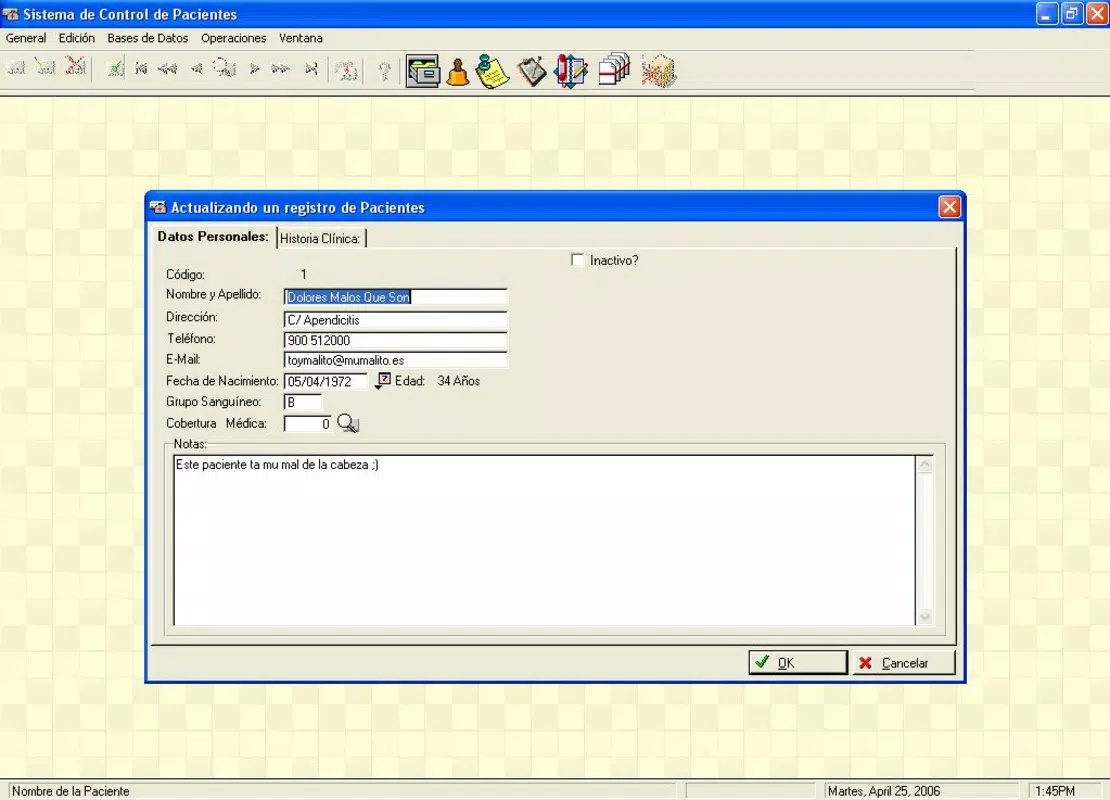
- User-Friendly Interface: The application features a clean, intuitive layout designed to minimize the learning curve for medical professionals, even those with limited technical experience. Navigation is straightforward, allowing users to locate patient records with minimal clicks.
- Digital Record Keeping: All patient histories are stored digitally on the user’s PC, removing the need for physical file cabinets and reducing clutter in clinical environments.
- Comprehensive Patient Management: Users can add, edit, and retrieve patient data swiftly. The system supports real-time updates, ensuring that the most current information is always available.
- One-Click Access: A single click provides instant access to any patient’s full medical history, improving workflow efficiency and allowing more time for patient interaction.
- Flexible Data Consultation: Whether reviewing a single patient’s records or cross-referencing multiple files, the software enables quick and seamless data retrieval, supporting informed clinical decisions.
- Print Functionality: The app includes a built-in option to print patient records, which remains essential for documentation, legal compliance, and sharing with other healthcare providers.
These features collectively support a practical workflow in clinical settings, where timely access to accurate data is critical. For example, a general practitioner can quickly pull up a patient’s allergy history before prescribing medication, or a specialist can review past treatments during a follow-up visit. The software’s emphasis on speed and simplicity makes it suitable for environments where efficiency directly impacts patient care quality.
Interface, UX & Performance
The user interface of Historias clinicas reflects a design philosophy centered on clarity and functionality. With a minimalistic layout, the app prioritizes essential actions—such as searching, adding, and viewing patient records—without unnecessary distractions. Navigation is linear and predictable, allowing users to move between sections with consistent visual cues. The color scheme and font choices appear optimized for readability, reducing eye strain during prolonged use.
Although the developer did not list formal performance metrics, the application’s lightweight footprint of 10.5 MB suggests it is designed to operate efficiently on older or low-resource Windows systems. This makes it accessible to clinics with limited IT infrastructure. Responsiveness appears to be a core focus, as the app supports immediate data retrieval and smooth transitions between records. Stability is implied by its long-standing presence in the market since 2012, though no official reports on crashes or data loss were provided.
While the app does not support cloud synchronization or multi-device access, its desktop-only nature ensures that data remains under local control. This may appeal to users concerned about data privacy, especially in regions with strict health information regulations. However, the lack of automated backups could pose a risk if the local system fails.
Platform Compatibility & Technical Requirements
Historias clinicas is designed exclusively for the Windows operating system. The current version is 1.0.0, and the application file size is 10.5 MB, indicating a lightweight and compact installation. The developer did not specify minimum OS requirements, so compatibility with modern Windows versions (such as Windows 10 or 11) cannot be confirmed with certainty. Users are advised to test the software on their system to ensure full functionality.
Given its release date in 2012, the app may not support the latest Windows security protocols or UI enhancements. However, its continued availability suggests it remains functional on legacy systems. The absence of mobile or web-based versions means the software is strictly desktop-bound, limiting its portability. For users seeking cross-platform access, this limitation may require alternative solutions.
Pros and Cons
Pros
- Free to download and use, making it accessible for small clinics and independent practitioners.
- Lightweight design with a small file size of 10.5 MB.
- Intuitive interface suitable for users with minimal technical experience.
- Supports quick access and management of patient records on a local PC.
- Includes printing capabilities for official documentation.
Cons
- Not available on mobile platforms such as Android or iOS.
- No cloud synchronization or remote access functionality.
- Developer did not provide details on data backup or encryption methods.
- Compatibility with current Windows versions is uncertain due to lack of specified requirements.
- Single-device usage limits flexibility in team-based or multi-location practices.
FAQ
Is Historias clinicas safe to download and install?
The app is distributed by ClinicaSoft and is free of charge. While no third-party security checks were mentioned, its long-standing presence suggests it has not been associated with malware or data breaches.
Can I use Historias clinicas on my Android or iOS device?
No, the application is currently only available for Windows. There is no official version for Android or iOS platforms.
Does the app support data backup?
The developer did not provide information on automated backup features. Users are advised to manually back up their data to prevent loss.
How often is Historias clinicas updated?
As of the latest release date in 2012, no recent updates have been published. The software may not include modern security or compatibility improvements.
Is the software suitable for team-based medical practices?
Due to its single-device nature and lack of multi-user support, Historias clinicas is best suited for individual practitioners rather than teams or multi-location clinics.
Final Thoughts
Historias clinicas offers a no-frills, cost-effective solution for medical professionals who need a reliable way to manage patient records on a Windows PC. Its simplicity, lightweight design, and free availability make it a practical choice for small clinics or solo practitioners seeking to digitize their documentation without investing in complex systems. While it lacks modern features like cloud access, multi-user support, and automatic backups, its core functionality remains relevant for users prioritizing ease of use and local data control.
For those who value straightforward, dependable software that gets the job done without unnecessary complexity, Historias clinicas remains a viable option. Its enduring presence in the healthcare software space speaks to its foundational utility. However, users should be mindful of its limitations, especially regarding data security and scalability.
Download Historias clinicas now


